
ZATCA E-Invoicing Phase 2: Architecture, Cryptography and Integration Guide
A senior engineer's guide to Fatoora Phase 2: UBL 2.1 XML, invoice hash chains, CSID onboarding, clearance vs reporting APIs, and how to design a resilient integration.
Saudi Arabia's e-invoicing program is one of the most complete real-time invoicing regimes in the region. Phase 1 (Generation), live since 4 December 2021, made electronic invoices mandatory. Phase 2 (Integration), rolled out in waves since 1 January 2023, turns every VAT-registered business's invoicing system into a node that exchanges cryptographically protected XML with the Zakat, Tax and Customs Authority (ZATCA).
This article is written for engineers and technical leads who need to design, build or review a Phase 2 integration. It focuses on architecture and failure modes rather than on form fields. Always confirm the latest specifications, XML implementation standards and deadlines on ZATCA's official portal, because details are updated over time.
What Phase 2 actually changes
In Phase 1, a compliant system had to produce invoices with mandatory fields and, for simplified invoices, a QR code. Phase 2 adds four architectural requirements:
- A structured data format. Invoices are produced as XML following UBL 2.1 with ZATCA-specific extensions. A human-readable PDF/A-3 with the embedded XML can accompany it.
- Tamper evidence. Each invoice carries a hash, and the hash of the previous invoice, forming a chain per invoicing unit. Gaps or edits become detectable.
- Device identity. Each invoicing solution unit is onboarded and receives a Cryptographic Stamp Identifier (CSID): a certificate tied to a private key that signs invoices.
- Online exchange. Standard (B2B) invoices are cleared in real time before reaching the buyer; simplified (B2C) invoices are reported within 24 hours.
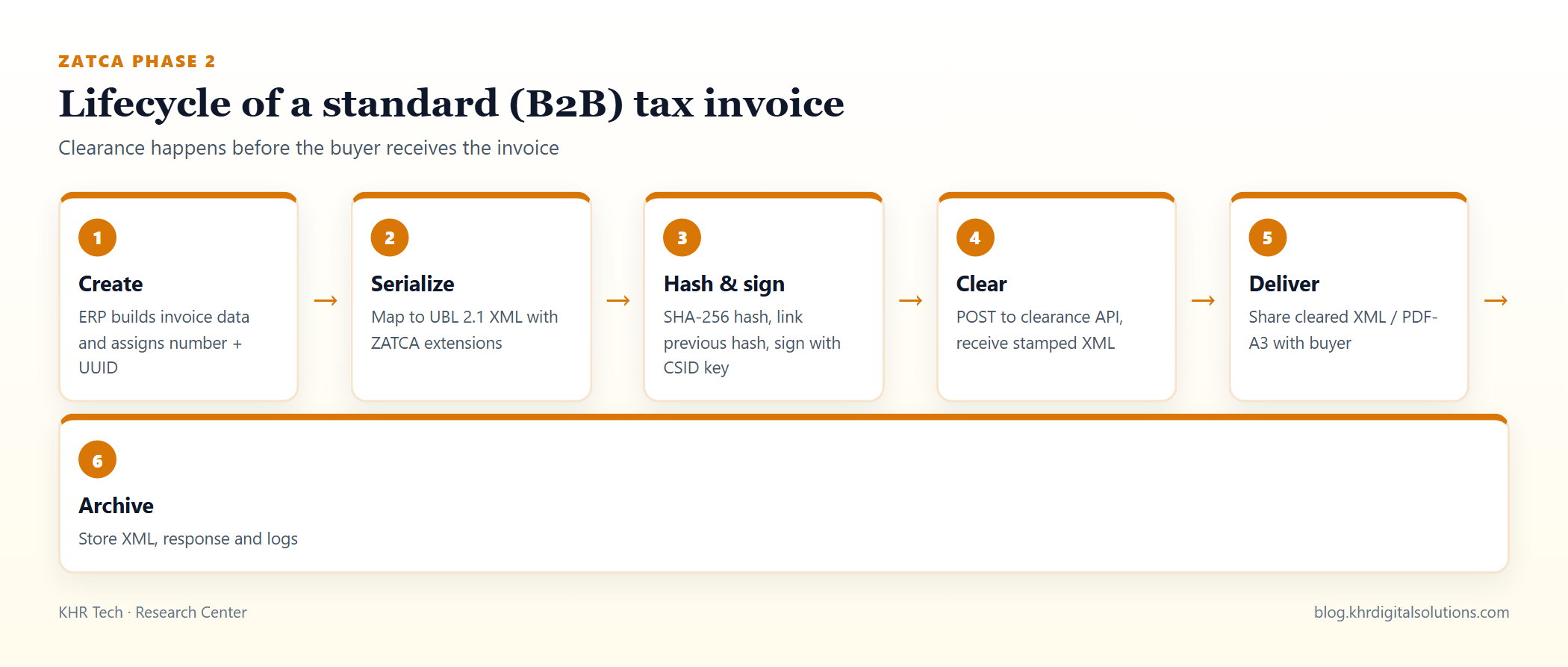 The B2B path: an invoice is only valid for the buyer after ZATCA clears it.
Clearance vs reporting in practice
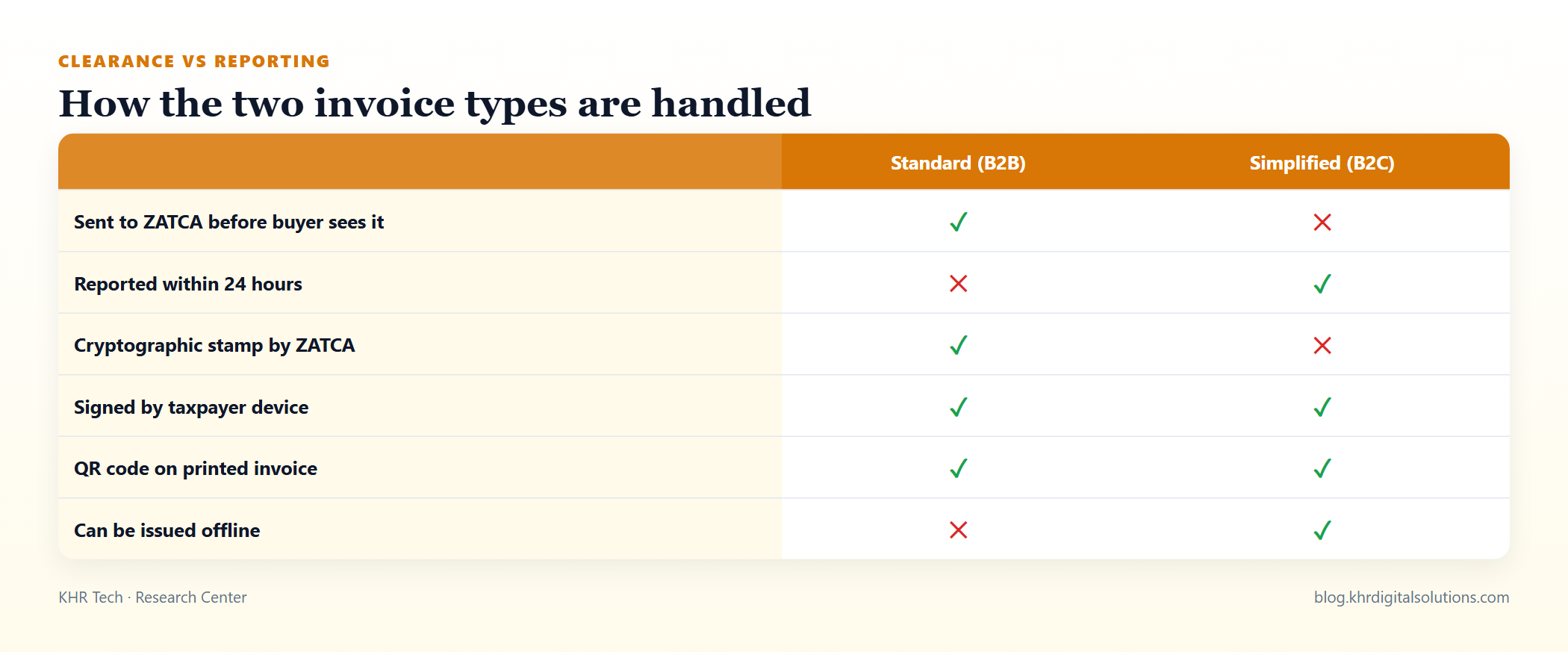 Simplified invoices keep the shop counter running offline; standard invoices need a reliable online path.
Clearance is synchronous. Your system submits the signed standard invoice; ZATCA validates it and returns the cleared XML containing ZATCA's stamp. Only that cleared document should be shared with the buyer. This places ZATCA on the critical path of your billing process, so latency, timeouts and validation errors must be handled explicitly.
Reporting is asynchronous from the customer's perspective. A simplified invoice is printed or sent immediately, then submitted to ZATCA within 24 hours. This is why POS systems can keep working during internet outages, as long as they queue invoices durably and report them later.
The data model behind a compliant invoice
A mature implementation separates the business invoice (what your ERP calls an invoice) from the e-invoice document (the XML artefact sent to ZATCA). Typical fields of the e-invoice record:
| Field | Purpose |
|---|---|
| Invoice number | Your sequential, human-facing number |
| UUID | Globally unique identifier for the document |
| Invoice counter value (ICV) | Monotonic counter per invoicing unit |
| Previous invoice hash (PIH) | Hash of the previous document in the chain |
| Invoice hash | SHA-256 over the canonicalised XML (excluding signature parts) |
| Signature and certificate | Proves which onboarded unit issued the invoice |
| QR payload | TLV-encoded tags including seller, VAT, totals, hash and signature data |
| Status | Draft, signed, cleared/reported, rejected, warning |
| ZATCA response | Full response stored for audit |
Treat ICV and PIH as per-unit sequences. If you run five POS terminals, each onboarded unit maintains its own chain. Sharing one chain across concurrent processes leads to race conditions and broken chains.
Hash chains and concurrency
The hash chain is the part most teams underestimate. Two invoices issued at the same millisecond on the same unit must still be ordered deterministically, and each must reference the exact hash of the one before it.
Practical rules:
- Serialise invoice finalisation per unit. Use a database row lock or a single-writer queue per invoicing unit when assigning ICV and PIH.
- Never edit a finalised invoice. Corrections are made through credit or debit notes referencing the original.
- Persist before you send. Store the signed XML, hash and counter in the database before calling ZATCA, so a crash cannot create a gap.
- Canonicalise consistently. Hashes are computed over a canonical XML form. Any difference in whitespace or element ordering between hashing and sending causes validation failures.
Onboarding and key management
Onboarding is performed per invoicing unit:
- Generate a key pair and a certificate signing request (CSR) containing the unit's identifiers.
- Use a one-time password from the Fatoora portal to request a compliance CSID.
- Pass the compliance checks by submitting sample invoices of each type you will issue.
- Request the production CSID used for live invoices.
- Renew certificates before expiry.
The private key is the crown jewel. Store it in a key vault, HSM or at minimum encrypted at rest with restricted access. Do not ship private keys inside application images or configuration files in source control. Plan renewal as an automated, monitored job rather than a calendar reminder.
A resilient integration architecture
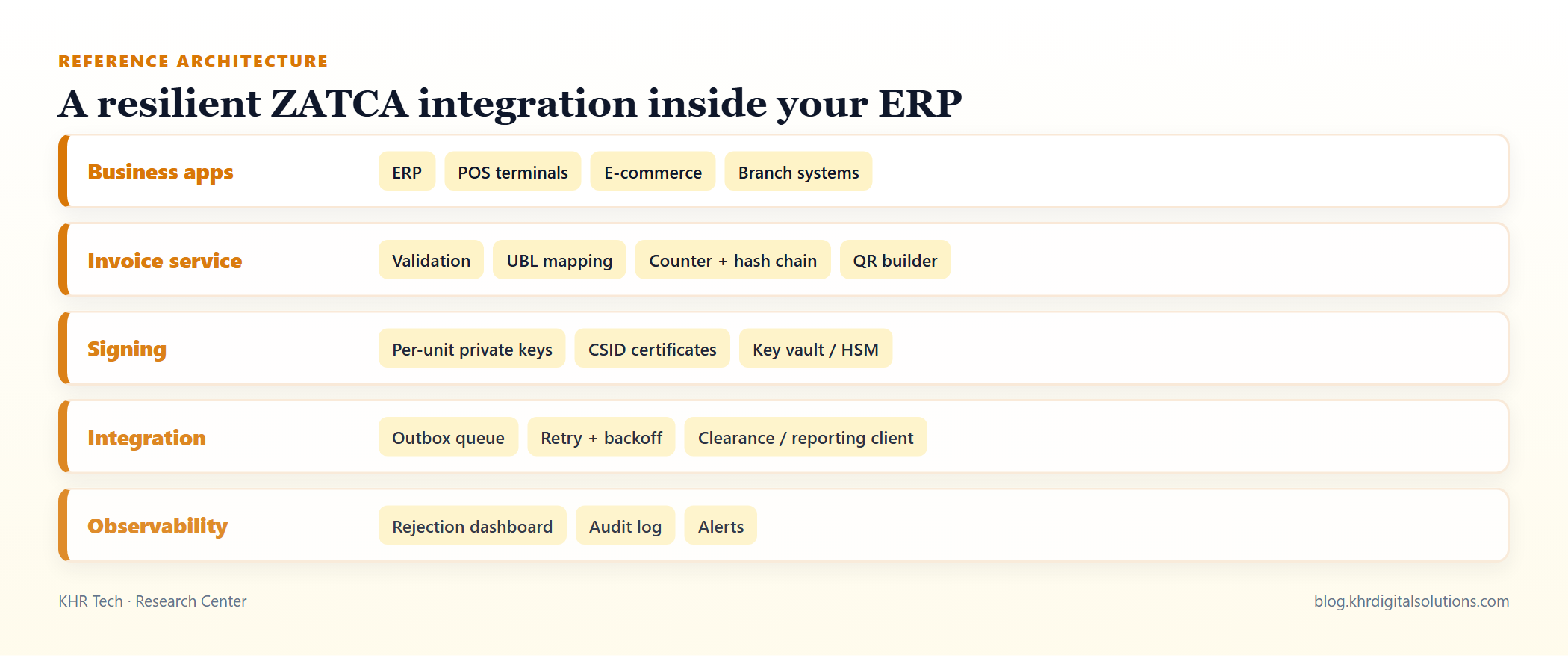 Separate invoice creation from transmission, and make transmission retryable and observable.
The pattern that holds up best in production is the transactional outbox:
- The invoice service validates the business invoice, maps it to UBL, assigns ICV and PIH, signs it and writes both the invoice and an outbox record in one database transaction.
- A background worker reads the outbox and calls the clearance or reporting API.
- Responses are stored, statuses updated, and failures retried with exponential backoff.
- Permanent rejections (validation errors) are surfaced to users with clear messages and never retried blindly.
This design gives you exactly-once creation, at-least-once delivery, and a complete audit trail. For B2B clearance, the user-facing flow can wait a few seconds for the worker's result; if ZATCA is unreachable, the invoice remains in a "pending clearance" state and is not shared with the buyer until cleared.
Validation before submission
Most rejections are data problems, not code bugs. Validate before signing:
- Seller and buyer VAT numbers in the correct format.
- Buyer address details required for standard invoices.
- VAT category codes and exemption reasons consistent with line amounts.
- Rounding: totals must reconcile with line-level amounts and VAT exactly as the specification expects.
- Credit and debit notes referencing a valid original invoice.
Building a local validator that mirrors ZATCA's business rules dramatically reduces rejected submissions and support tickets.
Testing strategy
- Unit tests for UBL mapping, rounding and QR TLV encoding.
- Golden-file tests: known invoices whose XML and hash must match byte-for-byte.
- Concurrency tests that issue hundreds of invoices in parallel on one unit and verify an unbroken chain.
- Sandbox integration tests against ZATCA's developer environment for every document type.
- Chaos tests that kill the worker mid-submission and confirm no duplicates or gaps.
Operations: what to monitor
| Signal | Why |
|---|---|
| Pending clearance count and age | Detect outages blocking B2B billing |
| Unreported simplified invoices older than 20 hours | Stay inside the 24-hour window |
| Rejection rate by error code | Find data quality problems |
| Certificate expiry dates | Avoid sudden signing failures |
| Chain integrity checks | Detect gaps or ordering problems early |
Common rejection causes and how to prevent them
From production integrations, the same handful of issues causes most rejected or warned submissions:
- Mismatched totals. Line-level VAT rounded differently from the document total. Compute VAT per line using the specification's rounding rules and derive totals from rounded lines, never the other way round.
- Broken previous-hash references. Usually caused by two processes finalising invoices for the same unit at once, or by a retry that re-signed an invoice with a new hash. Signing must happen exactly once, and retries must resend the stored XML byte-for-byte.
- Wrong document type codes. Credit and debit notes need the correct type code and a reference to the original invoice. Map these explicitly in code rather than relying on free-text fields.
- Clock drift. Issue timestamps ahead of ZATCA's servers can trigger warnings. Synchronise POS and server clocks with NTP.
- Mismatched certificates. A unit signing with a certificate issued for a different unit or environment (sandbox vs production) is rejected. Store the environment alongside each key and check it at startup.
A small internal rejection playbook that maps each error code to its root cause and the team that owns the fix shortens resolution time significantly.
Frequently asked questions
Can we reuse one CSID for all branches? Each invoicing solution unit should be onboarded with its own identity. This keeps chains independent and makes it clear which unit issued which invoice.
What happens if clearance is down during business hours? Standard invoices remain pending and must not be given to the buyer as valid tax invoices until cleared. Communicate this in your user interface and operating procedures. Simplified invoices continue and are reported later.
Should we build or buy the integration? If your ERP or POS vendor provides a certified, maintained Phase 2 module, using it is usually cheaper. Custom integrations make sense for bespoke systems, high volumes or multi-system landscapes, but they need ongoing maintenance as specifications evolve.
Key takeaways
- Phase 2 combines UBL 2.1 XML, per-unit hash chains, CSID-based signing and online clearance or reporting.
- Serialise ICV and PIH assignment per unit and never edit finalised invoices.
- Use a transactional outbox with retries for reliable, auditable transmission.
- Protect private keys, automate certificate renewal and monitor pending and rejected invoices.
KHR Digital Solutions designs and implements ZATCA Phase 2 integrations for ERP, POS and custom billing systems in the Kingdom, from architecture reviews to full delivery.
Sources and further reading
Related articles
Inventory Management Best Practices for Retailers and Distributors
Stock-outs and dead stock both cost money. Practical methods for accurate counts, reorder points, ABC analysis and multi-warehouse control.
Digital Transformation for SMEs: A Step-by-Step Roadmap That Actually Works
Forget buzzwords. A realistic roadmap for small and mid-sized companies to move from spreadsheets and paper to connected, automated systems.

HR and Payroll Automation: What to Automate First in a Growing Company
Attendance, leave, payroll, onboarding and approvals: which HR processes give the fastest return when automated, and how to roll them out smoothly.