
FBR Digital Invoicing in Pakistan: Integration Architecture and Go-Live Checklist
How Pakistan's FBR digital invoicing works for sales tax registered businesses: PRAL vs licensed integrators, the validate-and-post flow, sandbox scenarios, invoice numbers, QR codes and resilient ERP design.
Pakistan's Federal Board of Revenue (FBR) has moved sales tax invoicing from paper and after-the-fact returns to real-time digital reporting. Through SRO 709(I)/2025, dated 22 April 2025, integration of invoicing systems with FBR became mandatory for sales tax registered persons, replacing the older categories of integrated persons. Deadlines were later revised through further notifications, and enforcement measures such as penalties for non-integration have been introduced.
This guide is for business owners, finance teams and developers who need to connect an ERP, accounting or POS system. It focuses on how the integration works and how to design it so it does not disrupt billing. Always confirm current dates, rules and technical specifications on FBR's official website and the latest SROs, because they change.
What changes for a registered business
Before integration, invoices lived only in your system and appeared in FBR's records when you filed your monthly return. With digital invoicing:
- Each sales tax invoice (and debit or credit note) is sent to FBR electronically at the time of issue.
- FBR returns a unique invoice number, which must appear on the invoice together with a QR code and the digital invoicing logo, as specified by FBR.
- Your buyers' input tax claims depend on invoices that FBR has received, so late or missing integration affects your customers as well as you.
- Sales reported through integration feed into the sales tax return, which reduces mismatches between your books and FBR records.
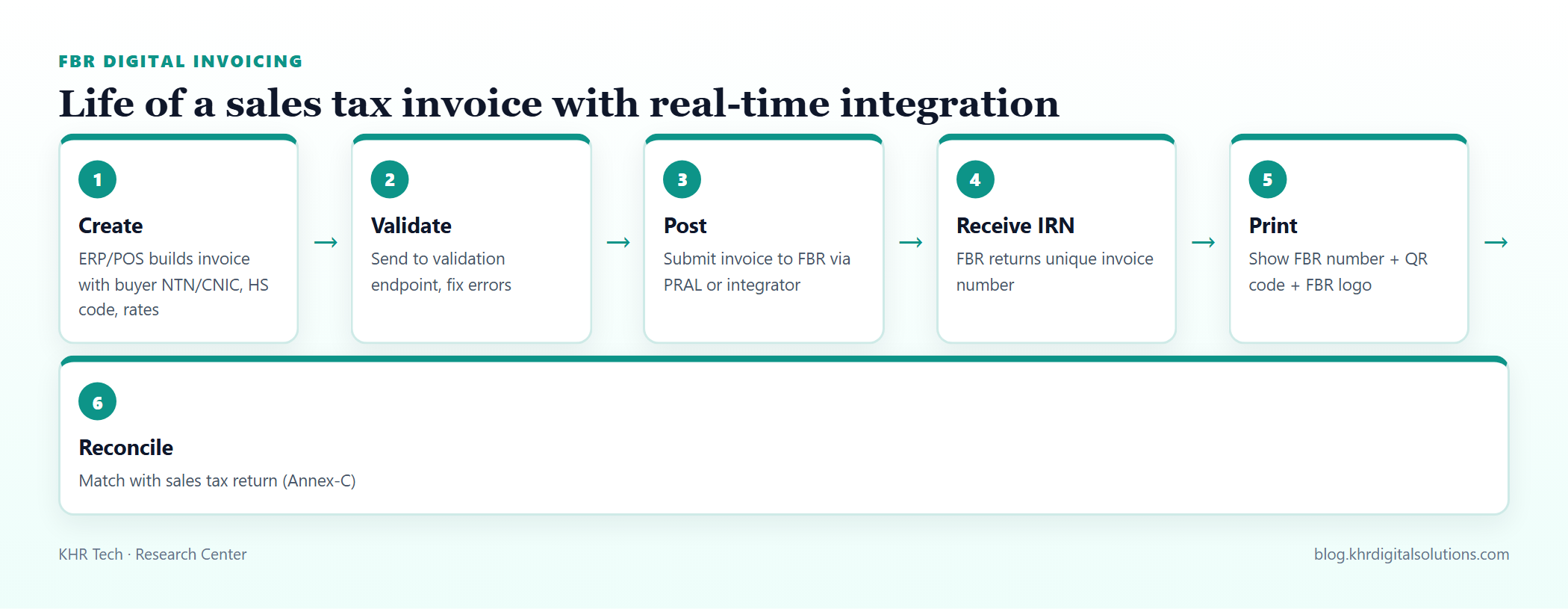 Validation before posting prevents most rejections.
Two integration routes
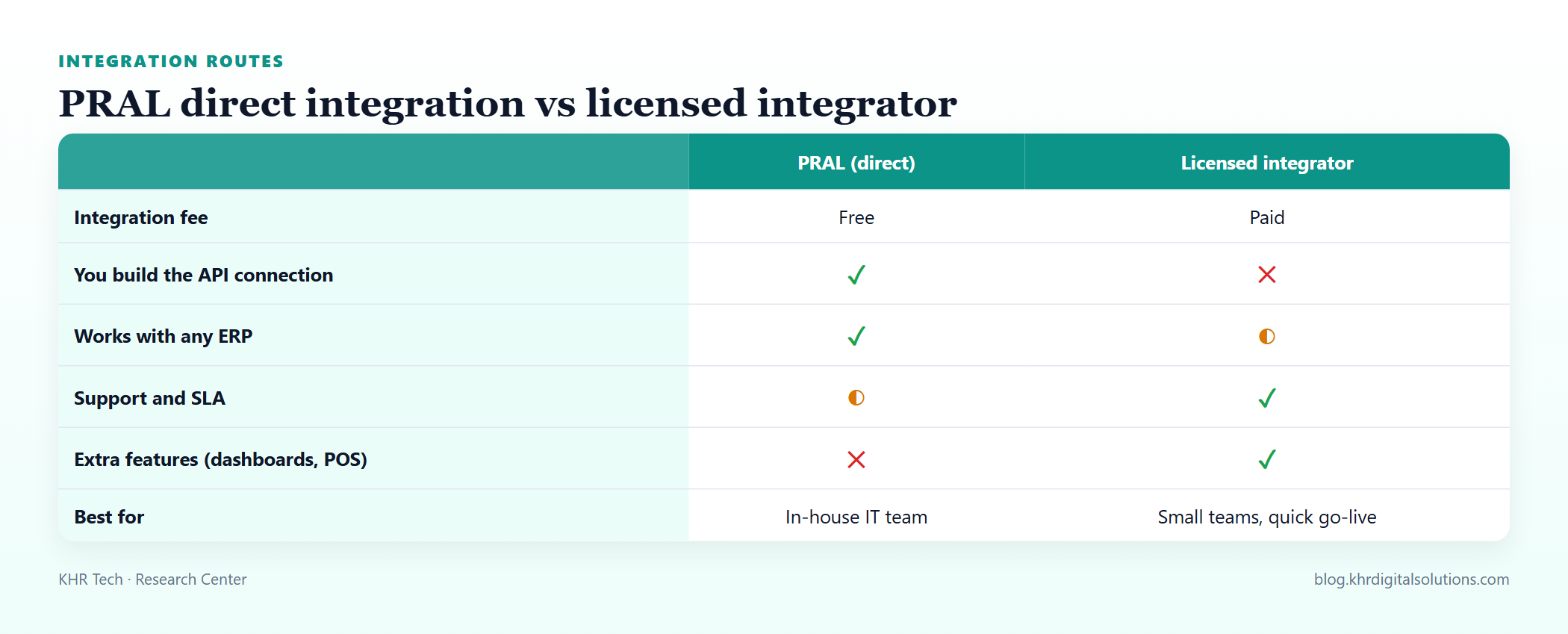 Both routes produce the same result in FBR's system; the difference is who builds and supports the connection.
PRAL (direct). Pakistan Revenue Automation (Pvt) Ltd, FBR's IT company, provides APIs that registered persons can connect to directly, without an integration fee. You (or your software vendor) build and maintain the connection.
Licensed integrators. Private companies licensed by FBR provide ready connectors, portals and support, usually for a fee. They suit businesses without in-house developers or that want dashboards and support contracts.
Whichever route you pick, the obligations remain yours: correct tax data, timely reporting and invoices that show FBR's number.
How the technical flow works
The direct integration follows a pattern familiar from other e-invoicing regimes:
- Registration and credentials. The business registers for digital invoicing through FBR's systems and obtains credentials (such as a security token) for the sandbox and later for production.
- Sandbox scenarios. Before production access, the system must pass test scenarios that cover the invoice types the business issues: standard rate sales, reduced rates, exempt and zero-rated supplies, sales to registered and unregistered buyers, debit and credit notes, and sector-specific cases.
- Validate. The invoice is sent as JSON to a validation endpoint, which checks fields and business rules and returns errors without recording the invoice.
- Post. The validated invoice is posted. On success, the response includes FBR's invoice number for the document (and line-level status).
- Print or send. The invoice shown to the buyer includes the FBR invoice number and QR code.
Typical invoice data includes seller and buyer NTN/CNIC, buyer registration type, province, invoice date and type, and per line the HS code, product description, quantity, unit of measure, value excluding tax, rate, sales tax, further tax or extra tax where applicable, and references to the relevant SRO or schedule for reduced or exempt items.
Designing the integration inside your ERP
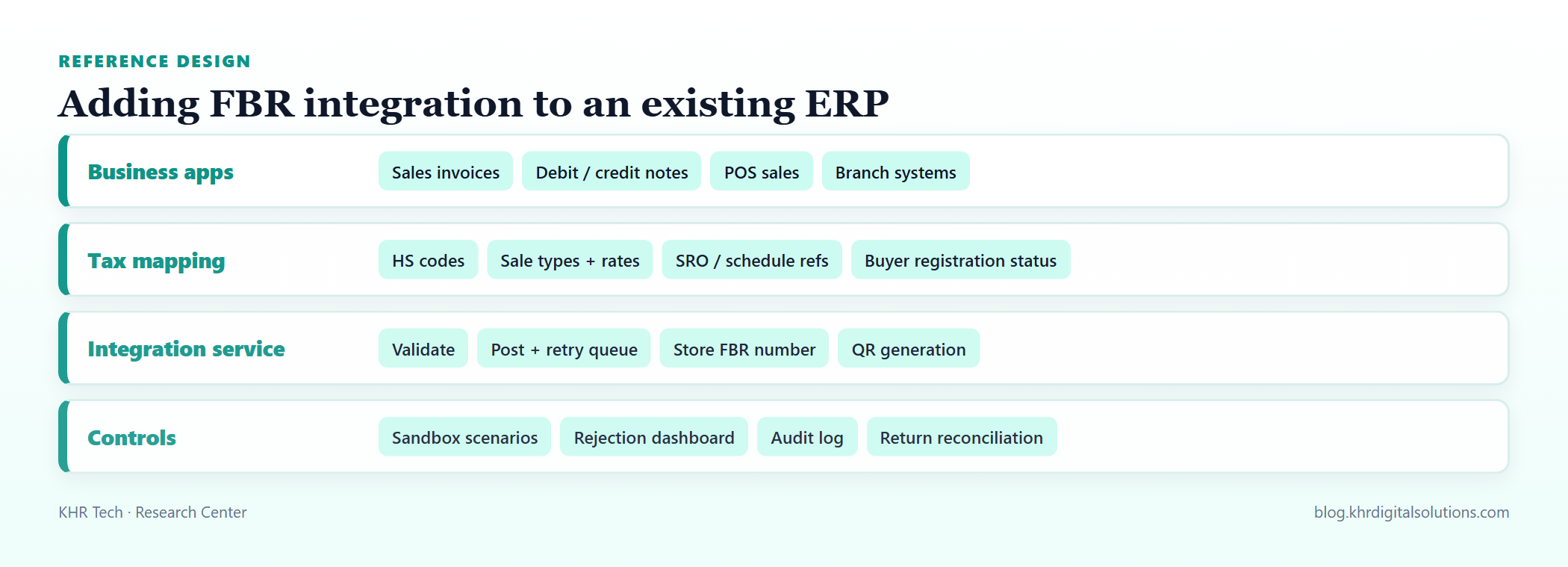 Keep tax mapping and FBR communication in a dedicated service, not scattered across screens.
Master data first. Most rejections come from master data, not code. Before go-live:
- Assign correct HS codes and units of measure to every item.
- Map each item and customer combination to the right sale type and rate, including SRO and schedule references for reduced-rate or exempt goods.
- Store buyers' NTN/CNIC and registration status, and refresh it, because the rate and further tax can depend on whether the buyer is registered.
A dedicated integration service. Build one component that validates, posts, stores responses and generates QR codes. Screens and reports call it rather than talking to FBR directly.
Queue and retry. Write the invoice and a pending submission record in one database transaction, then let a background worker post it. Network failures are retried with backoff; validation errors are shown to users with clear messages. This prevents both lost invoices and accidental duplicates.
Never print before you have FBR's number for invoices that require it. If FBR is unreachable, keep the invoice in a pending state and follow FBR's current instructions for downtime rather than inventing your own numbering.
Credit and debit notes must reference the original invoice. Design them as separate documents linked to the original FBR invoice number, never as edits to a posted invoice.
POS and retail
Large retailers have been required to integrate point-of-sale systems with FBR since earlier POS integration rules, with invoices carrying an FBR number and QR code that customers can verify. Retail POS integration and sales tax digital invoicing for business-to-business sales may involve different requirements and endpoints; check which regime applies to each sales channel, especially for businesses that sell both wholesale and retail.
Go-live checklist
| Area | Check |
|---|---|
| Registration | Digital invoicing registration complete, sandbox and production credentials stored securely |
| Master data | HS codes, units, rates and SRO references reviewed for all active items |
| Customers | NTN/CNIC and registration status verified for regular buyers |
| Scenarios | All sandbox scenarios relevant to your business passed |
| Templates | Invoice layout shows FBR number, QR code and required logo |
| Resilience | Retry queue, duplicate protection and pending-state handling tested |
| Reporting | Rejection dashboard and daily reconciliation report in place |
| People | Billing staff trained on error messages and credit-note process |
Common problems
- Wrong rate for unregistered buyers because registration status was not checked at invoice time.
- Missing or generic HS codes on items created years ago.
- Rounding differences between line totals and invoice totals. Calculate tax per line and derive totals consistently.
- Duplicate posting after timeouts, when the first request actually succeeded. Use an idempotent design: check status before re-posting.
- Manual invoices issued outside the ERP during busy periods, which then never reach FBR.
Frequently asked questions
Is digital invoicing only for large companies? SRO 709 extended the integration requirement to sales tax registered persons generally, with phased deadlines. Check the latest notifications to see when your category must comply.
Can we keep using our current ERP? Usually yes. Most modern ERPs can be connected either directly through PRAL's APIs or through a licensed integrator. Older systems may need a middleware service that reads invoices and posts them.
What happens if we do not integrate? FBR has introduced penalties and enforcement measures for non-compliance, and buyers may face problems claiming input tax. Treat integration as a priority project rather than a formality.
Key takeaways
- Sales tax invoices are now reported to FBR in real time and must show FBR's invoice number and QR code.
- Choose PRAL direct integration if you have developers; a licensed integrator if you need a supported, faster route.
- Clean master data (HS codes, rates, buyer status) prevents most rejections.
- Use a queue-based integration service with validation, retries and reconciliation, and confirm all dates with FBR.
KHR Digital Solutions connects ERP, POS and distribution systems with FBR digital invoicing, from master-data clean-up and sandbox scenarios to go-live support.
Sources and further reading
Related articles
Saudi PDPL Compliance for Software Teams: Data Mapping, Consent and Transfers
What Saudi Arabia's Personal Data Protection Law means for the systems you build: data inventories, lawful bases, consent, subject rights, breach notification and cross-border transfers.
Pakistan's $2.25B Battery Plan and PayTabs' Saudi Bid: What to Watch
A military-owned firm plans a $2.25B lithium-ion plant in Rawalpindi, PayTabs signs an MOU to buy SeaPay in Saudi Arabia, and Apple has a screen-fault replacement item. What we know so far.